


Calculation software Ansysanalysisdesignreporting

Add to favorites
Compare this product
Characteristics
- Function
- analysis, calculation, reporting, design
- Applications
- for ships
- Type
- automated
Description
Overview
SDC for Ansys is an Ansys Mechanical extension that embeds automated, standards-based structural verification into the Ansys environment. It works directly with Ansys Workbench .wbpj models and supports automated checks, report generation and design optimization without model translation.
Main features
What you'll achieve
Pre- & post-processing and toolkit
SDC for Ansys provides a comprehensive set of preparation and result-extraction tools to accelerate verification workflows:
Workflow & integration
Validation & trust
SDC for Ansys is used by engineering teams and certification bodies for verification tasks in projects requiring many load combinations, large FE models and standards-driven checks (examples: DNV, EN/Eurocode, ASME, API, ISO, NORSOK).
Technical specifications
SDC for Ansys is an Ansys Mechanical extension that embeds automated, standards-based structural verification into the Ansys environment. It works directly with Ansys Workbench .wbpj models and supports automated checks, report generation and design optimization without model translation.
Main features
- Ansys Mechanical extension: runs inside Ansys on .wbpj models without rebuilding the FE model.
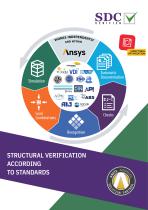
- Standards & design codes verification: automated checks for bolts, fatigue, buckling, strength and other criteria across 50+ codes.
- Design optimization tools: optimize cross-sections, weld types, yield stress and plate thickness driven by code check results.
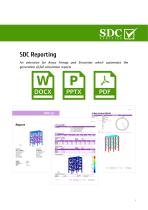
- Automatic reporting: template-based reports with plots and tables that can be regenerated after model updates.
- Complete analysis coverage: bolt, fatigue, buckling, strength and additional automated checks for varied project needs.
What you'll achieve
- Standards verification directly in Ansys Mechanical — confirm compliance without switching tools.
- Consistent, auditable results — reproducible checks and template reports for certification evidence.
- Time savings — automated checks and batch processing reduce manual calculation effort.
- Scalability — handle large FE models and hundreds of load combinations efficiently.
Pre- & post-processing and toolkit
SDC for Ansys provides a comprehensive set of preparation and result-extraction tools to accelerate verification workflows:
- Automatic structural element recognition — detect beams, plates, welds, stiffeners and connections.
- Loads and combinations insertion — apply Tank, Buoyancy, Wind, Wave and Current loads and build realistic load combinations.
- LS-DYNA result reading — import explicit LS-DYNA results (supported for compatible Ansys versions) and run checks on nonlinear dynamic outputs.
- Peak Finder — identify peak zones from results and verification checks with plots and summary tables.
- Moment & Shear Force tool — integrate grid-point forces to produce longitudinal moment and shear diagrams and export min/max per load set.
- Freebody — compute balanced internal/external forces and moments and retrieve contact/connector forces for substructure modelling.
- Compression-only supports — model one-way restraints and auto-create dependency loads for iterative sets.
- Rainflow counting — convert irregular time histories into cycle matrices for fatigue analysis (multiple filtering and cycle methods supported).
- Report generator & utilities — template-based report regeneration, Mass & COG tables, Thickness Plot, Weld Summation, Effective Plate Width, Stress Gradient, interpolation and more.
Workflow & integration
- Direct integration with Ansys Workbench (.wbpj) — no separate model translation required.
- Supports combined shell and beam modelling workflows and automated extraction of relevant checks and results.
- Compatible with Ansys scripting and automated processes to streamline repetitive verification tasks.
Validation & trust
SDC for Ansys is used by engineering teams and certification bodies for verification tasks in projects requiring many load combinations, large FE models and standards-driven checks (examples: DNV, EN/Eurocode, ASME, API, ISO, NORSOK).
Technical specifications
- Product type: Ansys Mechanical extension (Ansys Workbench add-on).
- Model compatibility: Works with Ansys Workbench .wbpj; LS-DYNA explicit results import supported for compatible Ansys versions.
- Standards library: Verification against 50+ industry codes (buckling, fatigue, bolts, strength, etc.).
- Automation: Template-based report generation; automated checks and batch processing of load combinations.
- Pre/post tools: Element recognition, loads & combinations insertion, Peak Finder, Rainflow counting, Moment & Shear extraction, Freebody, compression-only supports, thickness and weld tools.
- Outputs: Plots, tables and full verification reports suitable for audits and certification evidence.
- Intended users: Structural, mechanical, naval architects, piping, civil and design engineers; consultants and certification teams.
- Trial: Trial version and demonstration workflows available (installation handled by the provider).
Catalogs

Other SDC Verifier products
SDC Verifier Software


*Prices are pre-tax. They exclude delivery charges and customs duties and do not include additional charges for installation or activation options. Prices are indicative only and may vary by country, with changes to the cost of raw materials and exchange rates.
About NauticExpo
NauticExpo is a marketplace that offers B2B players a complete experience, from product sourcing to purchase. NauticExpo is an entity of VirtualExpo Group.
Are you a buyer?
Are you a supplier?
© 2026 All rights reserved - Terms - Privacy policy - General Terms - Manage cookies - 鄂ICP备2026053537号-4 -